You might think receipt management is hard and takes a lot of time. Manual work can make you lose papers and cause mistakes. These mistakes can slow your business down. Manual & auto receipt management smart batch system3.0 lets you handle receipts automatically. It helps you make fewer errors. Automation can cut manual work by up to 90%. This means weekly jobs take minutes instead of hours. You save real time. You also spend less money and get more correct results. Digital receipt capture stops manual data entry. When you use manual & auto receipt management smart batch system3.0, your work gets easier. Your team can focus on important things.
Key Takeaways
Using Smart Batch System3.0 for receipt management cuts down manual work by 90%. This saves time and makes things more accurate.
OCR technology gets receipt data by itself. You do not need to type it in. This lowers mistakes in money records.
Batch invoice processing lets you work with many receipts at once. This makes work faster and gives steady results.
Connecting to accounting systems helps move data easily. It stops double entries and keeps records current.
Cloud storage, mobile access, and traceability help keep receipts safe. These features also make the system easy to grow and ready for audits.
Manual & Auto Receipt Management ChallengesCommon Pain Points
Handling receipts by hand can cause many problems. These problems make your work slower and harder. It can be tough to keep your business running well. Here is a table that shows some pain points you might have:
| Pain Point | Description |
| Administrative Overhead | You spend lots of time on receipts. This makes labor cost more and reports take longer. |
| Data Accuracy Problems | Mistakes happen when you enter data by hand. This can cause errors in your records and audits. |
| Physical Receipt Deterioration | Paper receipts can fade or get lost. This makes it hard to follow tax rules and pass audits. |
| Scalability Limitations | Manual systems cannot handle lots of receipts. You need more people and space. |
| Lost Receipt Recovery Costs | You waste time looking for lost receipts. This can mean missing tax deductions and audit problems. |
| Tax Preparation Complexity | Messy receipts make tax time longer. You might miss out on deductions. |
You may see these problems in your daily work:
Lost receipts upset workers and slow down reimbursements.
Slow processing means you miss chances to save money.
Different ways of doing things can cause compliance risks.
Tip: If you use the same receipt process every time, you can avoid many problems.
Impact on Productivity
Manual receipt management can hurt how well your business works. When you handle receipts by hand, you spend too much time on easy tasks. Lots of receipts can overwhelm your team. Mistakes from manual entry mean more work fixing errors. You may also have compliance problems, which can lead to penalties. All these issues take time and resources away from important business jobs. Your financial records may not be correct, and your business may slow down. If you understand these impacts, you will see why improving your receipt management system matters.
Automate Receipt Management with Smart Batch System3.0
Key Features and Benefits
You can change how you handle receipts with manual & auto receipt management smart batch system3.0. This system uses special tools to help you work faster and make fewer mistakes. The Auto/Manual Batching Station by Changzhou Weibo Weighing Equipment System Co.,Ltd. is a great example of automation. You get an easy interface that lets you switch between manual and automatic modes. This makes it simple to handle different kinds of receipts and batches.
One big feature is ocr technology. This tool reads information from your receipts and puts it into your system. You do not have to type the data yourself. ocr technology finds numbers, dates, and names on each receipt. It works quickly and does not make mistakes like people sometimes do. You can trust your records to stay correct.
You also get batch invoice processing. This lets you handle many receipts at the same time. You do not need to process each one alone. Batch invoice processing saves you lots of time every week. You can upload a pile of receipts, and the system sorts and records them for you. ocr technology checks each receipt for errors. If it finds a problem, it tells you right away. This helps you stop mistakes before they cause trouble.
Traceability is another good thing. You can track every receipt from the moment you scan it. The system keeps a record of who handled each step. If you need to check a receipt later, you can find it fast. This makes audits and reviews much easier.
With manual & auto receipt management smart batch system3.0, you also get intelligent document processing. This means the system understands different types of documents and sorts them for you. You do not have to worry about mixing up business and personal receipts. The system keeps everything neat and organized.
Tip: Use workflow automation to set up rules for how receipts move through your business. This keeps your process smooth and lowers the chance of mistakes.
Integration with Accounting Systems
You need your receipt system to work well with your accounting tools. When you connect manual & auto receipt management smart batch system3.0 to your accounting software, information moves smoothly. This means you do not have to enter the same data twice. Your financial records stay correct and up to date.
Here is a table that shows common problems you might face when you connect receipt management software to your accounting system:
| Integration Challenge | Description |
| Technical Compatibility | The system works best when it fits with your financial platforms. |
| Duplicate Data Entry | Good integration stops you from entering the same data more than once. |
| Consistent Financial Records | Makes sure your records are correct and current in all systems. |
You can fix these problems by picking a system with strong integration features. Look for these choices:
API Integrations: These let your systems talk to each other in real time. Data moves automatically from your receipt system to your accounting software.
File Import/Export Options: These let you move data by uploading or downloading files. This way works, but it can be slower and may cause mistakes.
It is important to know how your tools connect. You want your receipt management system to link with your accounting and ERP platforms. This connection helps your business run smoothly.
Batch invoice processing is important for integration. You can process many receipts at once and send the data straight to your accounting system. ocr technology reads each receipt and fills in the right fields. You do not have to check each entry yourself. This saves you time and helps you avoid mistakes.
When you automate receipt management, your workflow gets faster and more reliable. You can trust your numbers and focus on growing your business.
Automated Batch Processing for Receipts
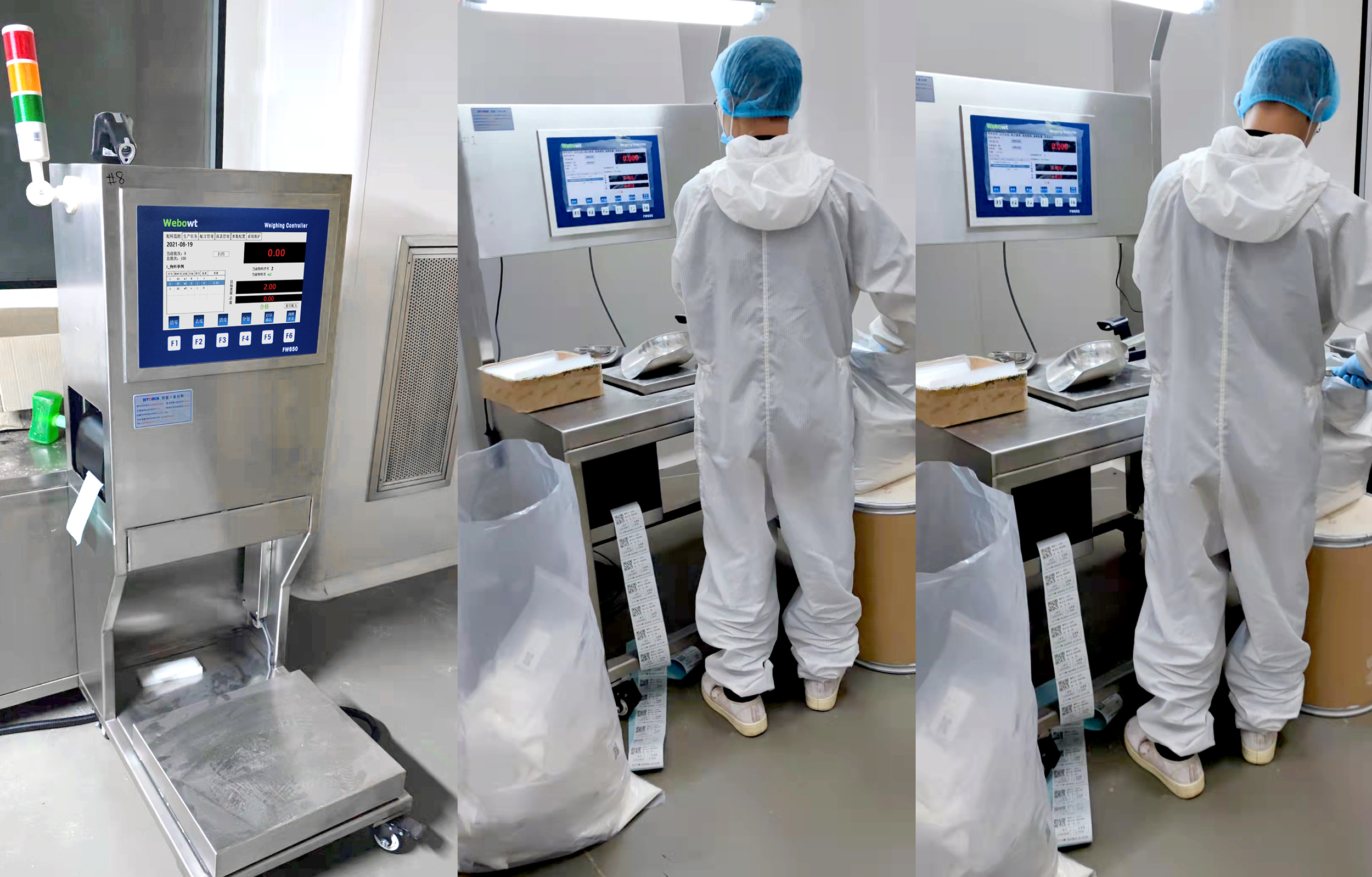
Automated batch processing changes how you handle receipts. You no longer need to check each receipt by hand. The system does the work for you. This saves time and helps you avoid mistakes. You can trust your records to be right every time. When you use batch invoice processing, you process many receipts at once. This makes your workflow faster and more reliable.
Setting Up Batch Invoice Processing
Getting started with batch invoice processing takes a few steps. You need to set up your system so it can handle different types of receipts. Some receipts may look different or have poor scans. You can solve these problems by following a clear setup process.
Here is a table that shows common challenges and solutions when you set up batch invoice processing:
| Challenge | Solution |
| Handling Non-Standard Invoice Formats | Use a pre-processing step to make all documents look the same and set rules for each vendor. |
| Managing Poor Quality Scans | Set scanning standards and use image tools to make scans clearer. |
| Extracting Data from Complex Tables | Choose OCR tools that can read tables and check the results carefully. |
| Training Requirements for Optimal Accuracy | Create a training plan with real samples and keep improving the system. |
You need to make sure your team knows how to use the system. A good training program helps everyone learn the steps. When you set up batch invoice processing the right way, you get better results and fewer errors.
Batch invoice processing plays a big role in business and industry. You can process hundreds of receipts in one go. This means you spend less time on simple tasks. Your team can focus on more important work. You also get a clear record of every receipt. This helps you during audits and reviews.
Tip: Always check your system with a few test batches before you go live. This helps you find and fix any problems early.
Streamlining Data Capture
You want your data to be right every time. Batch invoice processing uses smart tools to make this happen. The system uses OCR to read information from each receipt. You do not need to type anything by hand. This makes your work faster and more accurate.
Here are some ways batch invoice processing improves your workflow:
OCR reads numbers, dates, and names from receipts.
Intelligent Document Processing checks the data for mistakes.
Machine learning helps the system get better over time.
You get predictable processing windows. This means you know when your receipts will be ready. The system keeps audit-ready records. You can track every step for each receipt. You do not need to worry about missing a deadline or losing a receipt.
Batch invoice processing also helps you keep your records clean. The system checks for duplicate payments and errors. You get a clear audit trail. This makes it easy to find any receipt when you need it.
Here is a table that shows what you gain from batch invoice processing:
| Key Outcomes of Batch Automation in Financial Services |
| Predictable processing windows that align with deadlines |
| Audit-ready records with full transaction traceability |
| Reduced manual intervention in high-volume workflows |
| Consistent output quality at any scale |
You will see big improvements in efficiency. Batch invoice processing lets you handle more work with less effort. You also get better data extraction accuracy. Your records stay correct, and your business runs smoothly.
Note: Batch invoice processing is not just for big companies. Small businesses can also use it to save time and avoid mistakes.
Choosing the Right Receipt Management Software
Essential Features to Look For
When you pick receipt management software, you want tools that help you work faster and make fewer mistakes. Look for ocr technology. This tool reads words and numbers from receipts and puts them in your system. You do not have to type things in yourself. Ocr technology helps you stop errors and saves time.
Mobile access is also important. You can use your phone to take a picture of a receipt and upload it right away. You do not need to keep paper copies. Cloud storage keeps your receipts safe. You can find them on any device. Even if your computer breaks, you will not lose your records.
Here are some features you should look for:
Ocr technology for quick and correct data capture
Mobile receipt capture for fast uploads
Secure cloud storage for easy backup and access
Integration with your accounting system
Custom expense categories for your business
Simple user interface so it is easy to use
Scalability to handle more receipts as you grow
Reliable customer support and regular updates
Tip: Choose software that fits your business now and can grow with you.
Comparing Leading Solutions
There are many choices for receipt management software. Each one has different features and benefits. The table below shows how some top options compare, especially in how they grow and their special tools.
| Software Solution | Scalability Features | Pros and Cons |
| Doxis SpendControl | Manages receipts, expenses, and approvals | Easy dashboards, fraud detection, strong integration |
| Doxis AI.dp | AI-powered, best for medium to large businesses | Most scalable, advanced document workflows |
| Zoho Expense | Simple, cost-effective for small businesses | Affordable, covers main features |
| Expensify | Specialized scanner, multi-currency support | Great for scanning, has fraud detection |
| Billdock | Unlimited users, proactive card controls | Good for growing, may have extra features some do not need |
Think about what your business needs. Small businesses may want simple tools and easy reports. Large companies may need advanced ocr technology and strong links to other systems. Always check if the software meets security rules like GDPR or SOC 2 Type II. This keeps your data safe and helps you follow the law.
Note: The right software will help you save time, make fewer mistakes, and keep your business ready for audits.
Best Practices and Troubleshooting
Error Prevention and Traceability
You can stop mistakes in your receipt management system by following some smart steps. Start by using ocr technology to pull out and sort receipt data. This tool reads details from receipts and puts them where they belong. You do not have to name files yourself, so you make fewer errors.
Set your software to spot problems right away. Real-time policy controls catch mistakes or rule breaks before they cause trouble. You can use AI-driven tamper detection to check if a receipt is real or changed. Protect your financial data with automatic checks that find fake or changed documents.
Move your records to a cloud platform that keeps a copy you cannot change. This step keeps your data safe and makes sure you always have a backup. Traceability gives you a clear record of each step. You can see who approved every receipt and when. This helps you get ready for audits and keeps your business following rules.
Tip: Use workflows that fit your company’s policies. This lowers mistakes and makes your process stronger.
Automate metadata sorting with ocr technology.
Use simple language policy controls.
Try AI-driven tamper detection.
Store records in digital storage that cannot be changed.
Keep a lasting audit trail for every transaction.
Separating Business and Personal Receipts
You need to keep business and personal receipts apart. This helps you avoid tax problems and keeps your records clear. Start by opening a business bank account. This makes it easy to track only business spending.
Follow these steps to keep your receipts neat:
Save all receipts digitally. This stops paper mess and keeps records safe.
Use software to tag and comment on receipts. Digital tags work better than writing notes by hand.
Ask vendors for digital receipts. These are easier to store and search.
Avoid cash payments. Card transactions are easier to track and automate.
Let your system make receipts for each transaction. Do not rely only on bank statements.
Automate your receipt management process. This lowers mistakes and saves time.
Mixing business and personal receipts can cause tax issues. You might miss out on deductions or have trouble during an audit. Keeping them separate shows your true business performance and makes audits easier.
Note: Good habits now will save you time and stress later.
You can change how you handle receipts with manual & auto receipt management smart batch system3.0. When you use automation, your work gets faster and more correct. Automated batch processing helps you follow financial rules. You get clear records and can track every receipt. Batch invoice processing gives quick results and keeps your data safe. It helps you follow rules and makes audits easier. It also lowers mistakes and saves time. Batch invoice processing makes your business better and helps it grow. It keeps your records ready for checks. You can try the Auto/Manual Batching Station. Start a trial or talk to a provider.
FAQ
What is Smart Batch System3.0?
Smart Batch System3.0 helps you manage receipts and batches. You can use it to scan, sort, and store receipts. It uses smart tools like OCR to read data. You save time and avoid mistakes.
How does OCR technology help with receipts?
OCR technology reads words and numbers from your receipts. You do not need to type them in. This tool makes your records more accurate and saves you time.
Can I use Smart Batch System3.0 with my current accounting software?
Yes, you can connect Smart Batch System3.0 to many accounting tools. The system supports API integration and file import/export. This helps you keep your records up to date.
Is Smart Batch System3.0 safe for my business data?
You get strong data protection. The system uses secure cloud storage and keeps a backup of your records. You can trust your data stays safe and ready for audits.

